Here you find a list of working microSD cards for the box. It seems to be very particular. Be sure you format your microSD with fat32.
Working #
SanDisk #
- 128GB SanDisk Ultra microSDXC I 1 A1
- 64GB SanDisk Ultra microSDXC I 1
- 16GB SanDisk Ultra microSDXC I 1
- 8GB SanDisk EDGE microSDHC I 4
- 2GB SanDisk microSD
- 32GB Micron microSDHC I 1
- 32GB Perciron microSD (noname Aliexpress)
Samsung #
- 512GB Samsung EVO Plus microSDXC UHS-I Class 10 U3 (MB-MC512KA/EU)
Intenso #
- 64GB Intenso Micro SDHC memory card I 1 C10 (ASIN B00KIOWX4O) 1
Not Working #
Samsung #
- 512GB SanDisk Ultra microSDXC I 1 Class 10 U1 A1
- 32GB Samsung EVO Plus microSDHC I 1
- Intenso microSDHC 8GB Class 10
SD card extension #
For convenience a SD extension cable can be used to place the card in a better accessible way. A 25 cm cable is recommend.
You can use both types of cables:
- microSD card – microSD card
- microSD card – SD card

Cable modification #
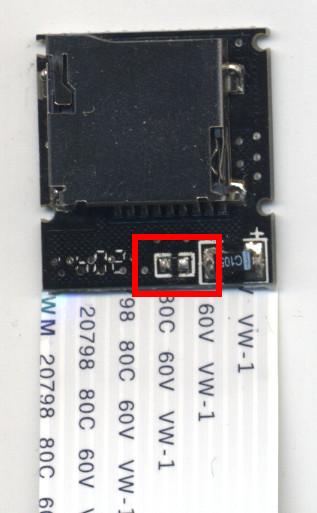
Out-of-the box the cable is not working because of the resistor between VDD (3.3 V) and CLK. The reason for that is unclear.
It is necessary to remove this resistor.
In Linux, format with
mkfs.vfat -F32. ↩︎